
用户态Linux
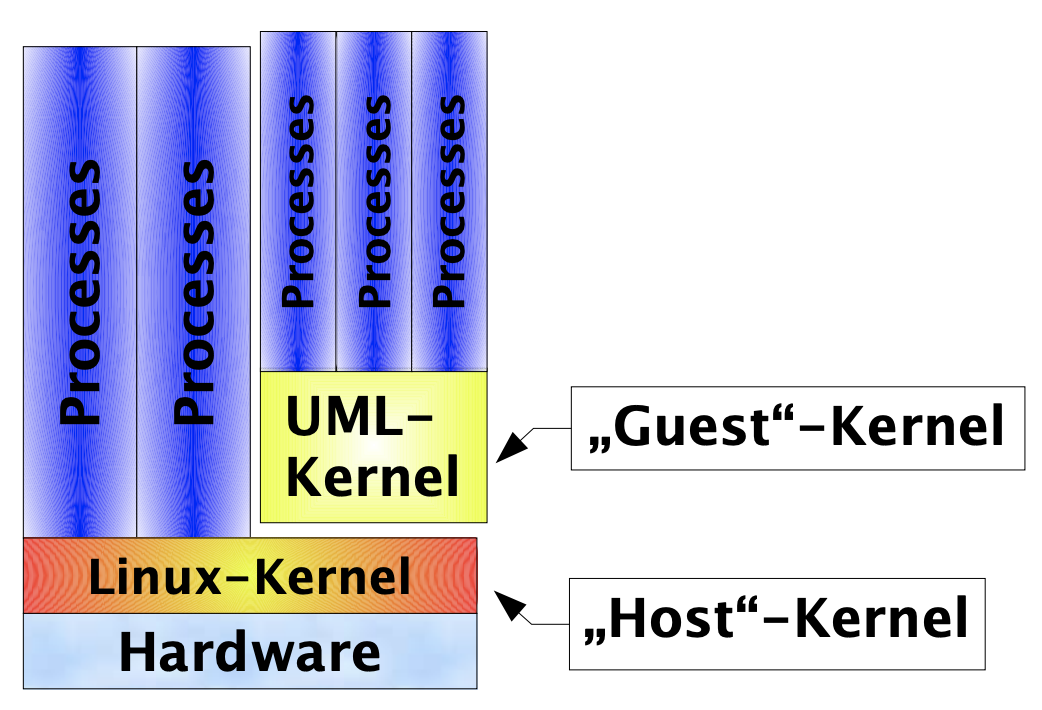
UML将Linux内核编译为一个可执行文件,直接在宿主机的用户空间中运行,无需硬件虚拟化如KVM或VMware支持。每个UML实例是一个独立的进程,拥有自己的虚拟内核和用户空间,主要用于调试、测试、虚拟化和隔离环境等场景
sudo apt-get install screen uml-utilities
./linux ubda=rootfs.img umid=debian mem=512M
screen /dev/pts/x
mount / -o remount,rw
uml_mconsole debian   {>>uml控制终端<<}
0.编译kernel
make ARCH=um SUBARCH=x86_64 defconfig
make ARCH=um SUBARCH=x86_64 -j4
1.rootfs构造
truncate -s 128G rootfs.img
mkfs.ext4 rootfs.img
sudo mount -o loop rootfs.img /mnt
sudo debootstrap stable /mnt http://ftp.cn.debian.org/debian
sudo make modules_install INSTALL_MOD_PATH=/mnt ARCH=um SUBARCH=x86_64
2.网络设置
2.1legacy网络
网络配置一般形式: eth<n>=<transport>,<transport args>,其中ethn表示uml实例中网络接口名称,transport表示host支持的网络后端。
- ethertap
- tuntap
- multicast
- a switch daemon
- slip
- slirp
- pcap
ethertap
Ethertap is the general mechanism on 2.2 for userspace processes to exchange packets with the kernel.
注意,2.5.x内核不再支持:
Ethertap is now an obsolete facility, and is scheduled to be removed in the 2.5.x kernel series. Those writing applications using ethertap should convert their code to use the TUN/TAP driver instead, see ’tuntap.txt’ in this directory for more details. DaveM 1
tuntap
TUN/TAP is the preferred mechanism on 2.4 to exchange packets with the host. The TUN/TAP backend has been in UML since 2.4.9-3um.
-
uml_net配置tuntap
/* host主机 */ sudo ./linux ubda=rootfs.img umid=debian mem=512M eth0=tuntap,,,192.168.200.100 sudo iptables -t nat -A POSTROUTING -s 192.168.200.0/24 -j MASQUERADE /* uml实例 */ ip link set dev eth0 up ip addr add dev eth0 192.168.200.101/24 ip route add default via 192.168.200.100 dev eth0 -
手动配置tuntap
/* host主机 */
sudo tunctl -u peter  # 创建uid权限可用的tap设备
sudo ifconfig tap0 192.168.100.254 up
sudo bash -c 'echo 1 > /proc/sys/net/ipv4/ip_forward'
sudo route add -host 192.168.100.253 dev tap0
sudo bash -c 'echo 1 > /proc/sys/net/ipv4/conf/tap0/proxy_arp' # 转发不属于本接口的arp请求代理
sudo iptables -t nat -A POSTROUTING -s 192.168.100.0/24 -j MASQUERADE
./linux ubda=rootfs.img umid=debian mem=512M eth0=tuntap,tap0

/* uml实例 */
ip link set dev eth0 up
ip addr add dev eth0 192.168.100.253/24
ip route add default via 192.168.100.254 dev eth0
multicast
The simplest way to set up a virtual network between multiple UMLs is to use the mcast transport. This was written by Harald Welte and is present in UML version 2.4.5-5um and later. Your system must have multicast enabled in the kernel and there must be a multicast-capable network device on the host.
sudo ./linux ubda=rootfs.img umid=debian mem=512M eth0=mcast,52:54:00:12:34:58,230.0.0.1,1234
pcap
注意,需要在编译内核过程中,勾选UML_NET_PCAP选项
pcap配置一般形式: ethn=pcap,host interface,filter expression,option1,option2
sudo ./linux ubda=rootfs.img umid=debian mem=512M eth0=pcap,wlp2s0
2.2vector网络
网络配置一般形式: vecX:transport="Transport Name",option=value,option=value,...,option=value,其中vecX表示uml实例中网络接口名称,transport表示host支持的网络后端。
- tap
- hybrid
- raw
- eogre
- eol2tpv3
- bess
- fd
tap
vec网络提供与传统网络类似tuntap的后端tap,但由于linux不支持用户态程序在tap设备上multi-packet,因此tap后端并不是矢量传输接口设备
/* host主机 */
sudo ip tuntap add tap0 mode tap
sudo ifconfig br0 promisc up
sudo ifconfig usb0 promisc up
sudo brctl addbr br0
sudo brctl addif br0 usb0
sudo brctl addif br0 tap0
sudo ./linux ubda=rootfs.img umid=debian mem=512M vec0:transport=tap,ifname=tap0,depth=128,gro=1

/* uml实例 */
mount / -o remount,rw
dhclient vec0
hybrid
hybrid是vec网络提供的实验性接口。在发送时使用tap socket,在接收时使用raw socket,原始套接字允许多数据包接收,导致接口数据包接收性能增强。用法与tap接口相同
raw
/* host主机 */
sudo ip link add veth0 type veth peer name p-veth0
sudo ifconfig veth0 192.168.4.1 netmask 255.255.255.0
sudo ifconfig veth0 up && sudo ifconfig p-veth0 up
sudo ./linux ubda=rootfs.img umid=debian mem=512M vec0:transport=raw,ifname=p-veth0,depth=128,gro=1

/* uml实例 */
ifconfig vec0 192.168.4.2 netmask 255.255.255.0
ifconfig vec0 up